
What Is a Proxy IP Address?
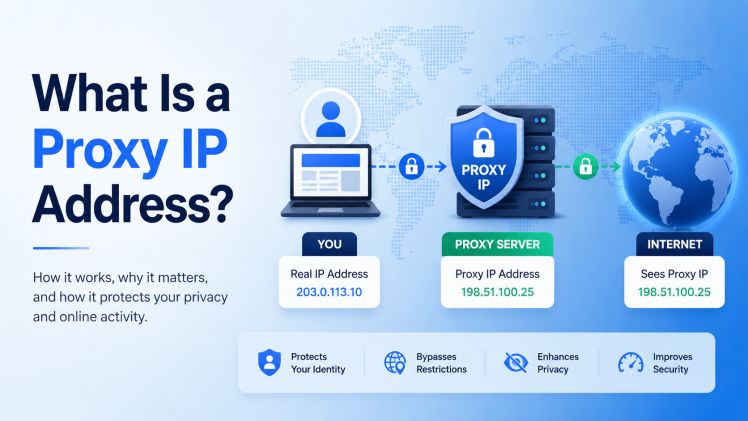
Every device on a network carries an IP address, and that address travels with almost every request you make. For one person browsing, that is rarely a problem. For a team pulling thousands of pages an hour for market research, a single origin IP becomes a bottleneck fast – rate limits, throttling, and skewed data follow. This is the problem a proxy IP address solves.
A proxy IP address is the public IP of an intermediary server that handles your web requests on your behalf. When you route traffic through it, the destination server records the proxy’s IP instead of your own, because the proxy terminates your connection and opens a fresh one toward the target.
That one-sentence definition hides a lot of engineering detail. The rest of this guide covers what a proxy IP address really is, how it behaves on the wire, the types you will actually choose between, and the trade-offs that decide whether a deployment works or quietly fails.
What a proxy IP address actually is
Picture two separate connections instead of one. Your client opens a connection to the proxy; the proxy opens a second connection to the destination. The proxy stitches the two halves together, which means the destination only ever sees the second connection – and the IP that originated it.
That originating IP is the proxy IP address. It is a real, routable address assigned to the proxy server, and it is what shows up in the target’s access logs, rate-limit counters, and reputation systems. Your own address never reaches the destination, provided the proxy is configured to keep it out.
This is also where a common confusion starts.
Proxy IP address vs. proxy server address vs. your IP
People use these terms interchangeably, but they are not the same thing.
Your IP address is the address your own device or network was assigned by your ISP. The proxy server address is the connection string you configure in your client – a host and port such as 203.0.113.10:8080, sometimes with credentials in the user:pass@host:port form. The proxy IP address is the egress IP the destination actually observes.
In simple setups the proxy server address and the proxy IP address are the same number. In rotating or load-balanced setups they diverge: you connect to one stable gateway, but the IP that reaches the target changes from request to request. Keeping the three straight saves hours of debugging when traffic does not behave the way you expect.
How a proxy IP address works at the network level
When a request leaves your client, it reaches the proxy first. With an HTTP proxy, a plaintext request is forwarded directly; for HTTPS, the client issues a CONNECT and the proxy opens a tunnel it cannot read into, passing the encrypted bytes through untouched.
A SOCKS5 proxy operates lower down, at the session layer. It is protocol-agnostic – it forwards TCP and UDP without parsing application data – which is why it handles non-web traffic that an HTTP proxy cannot.
Headers are where proxies betray themselves. A poorly configured proxy appends an X-Forwarded-For or Via header, or the standardized Forwarded header from RFC 7239, that carries your original IP straight to the destination. The proxy IP address changes, but the real one rides along in the metadata. Whether those headers are stripped is the single biggest factor in how anonymous a proxy actually is.
DNS is another quiet leak. If your client resolves hostnames locally instead of through the proxy, the request itself routes correctly, but your resolver lookups can still hint at where the traffic really originates.
Types of proxy IP addresses
“Proxy” is one word for several very different products. The right choice depends almost entirely on the target you are hitting and the job you are running.
By IP origin – datacenter, ISP, residential, mobile
The most consequential distinction is where the IP comes from, because that determines how anti-bot systems score it.
Datacenter IPs belong to hosting and cloud providers. They are fast and cheap, but they sit in contiguous subnets registered to hosting ASNs, which makes them easy to identify and to block in bulk. Residential IPs are assigned by consumer ISPs to real households, scattered across thousands of ASNs, so they carry far higher trust. ISP IPs – also called static residential – are a hybrid: hosted on server hardware but registered to an ISP, giving residential-grade reputation at near-datacenter speed. Mobile IPs come from carrier networks, sit behind carrier-grade NAT, and are shared by many real users at once, which makes them the hardest to flag and the most expensive to run.
| IP type | Where the IP comes from | Typical latency | Billing | Best-fit workload |
| Datacenter | Hosting/cloud ASNs, contiguous subnets | ~10 ms | Per IP / month | High-volume scraping of unprotected targets, internal QA, uptime checks |
| ISP (static residential) | Server hosts with ISP-registered IPs | ~50–150 ms | Per IP / month | Session-persistent automation, long-running collection jobs |
| Residential (rotating) | Real consumer broadband, scattered ASNs | ~0.5–2 s | Per GB | Market and price research on defended sites, ad verification, SERP monitoring |
| Mobile (4G/5G) | Carrier IPs behind CGNAT, many users per IP | Variable, higher | Per GB or per IP | Verifying mobile ad delivery, mobile-rendered data collection |
By anonymity level – transparent, anonymous, elite
A transparent proxy identifies itself and forwards your real IP in the headers; it is used for caching and content filtering, not privacy. An anonymous proxy hides your IP but still announces that a proxy is in use. An elite, or high-anonymity, proxy strips the giveaway headers entirely, so the destination sees a clean request from the proxy IP address with no proxy signature. For data work where you want representative responses, elite behavior is the baseline, not a luxury.
By assignment – static vs. rotating, IPv4 vs. IPv6
A static proxy gives you the same IP for as long as you hold it, which matters when a workflow needs session continuity. A rotating proxy draws a new IP per request or per timed interval from a pool, with sticky sessions available when you need one IP to persist for a few minutes.
IPv4 and IPv6 add a cost dimension. IPv4 is scarce and priced accordingly; IPv6 is abundant and cheap per address, but many targets still do not support it or treat an entire /64 block as one entity, so the savings only help where the destination cooperates.
What proxy IP addresses are used for
In production, proxy IPs are infrastructure for data, not a novelty. The common workloads are web scraping and large-scale data collection, price and market research across regions, ad verification, SEO and SERP monitoring, and uptime and performance testing.
The shape of each job dictates the proxy. Scraping public catalogs at volume runs cheaply on datacenter IPs until a target starts defending itself, at which point block rates climb and the work shifts to residential. Price research that depends on seeing localized listings needs IPs in the right country, so the dataset reflects what a local shopper would see rather than a head-office IP in another region.
Ad verification follows the same logic: to confirm a campaign renders correctly in a given market, you observe it from an IP in that market. SEO monitoring leans on the same regional accuracy – search results vary by location, and pulling them from the right place keeps rank tracking honest. Performance and uptime testing uses geographically spread IPs to measure what real users in different regions actually experience. None of this requires anything exotic; it requires the right IP in the right place, reliably.
Limitations and trade-offs engineers actually hit
A proxy IP address changes what the destination sees. It does not make your traffic invisible, and treating it as a privacy guarantee is the fastest way to get burned. The honest failure modes are these:
- No encryption by default. An HTTP proxy forwards plaintext; only the HTTPS tunnel or the application’s own TLS protects the payload, and the proxy itself can see anything unencrypted.
- Header and DNS leaks. X-Forwarded-For, Via, or local DNS resolution can expose the origin even when the proxy IP address looks clean.
- Subnet and ASN bans. Datacenter ranges share blocks; one flagged IP can taint its neighbors, and whole /24s get blocked at once on defended targets.
- Added latency. Every request now takes two hops instead of one – datacenter adds milliseconds, residential and mobile can add seconds.
- Shared-IP reputation. On a cheap shared pool, a “bad neighbor” who abused the IP before you becomes your problem: captchas and blocks you did not earn.
- Bandwidth cost on metered plans. Per-GB residential billing punishes media-heavy pages, so a job that pulls images and video can cost many times what the same page count costs on a per-IP datacenter plan.
Most production incidents trace back to one of these six, not to anything subtle. Match the proxy type to the target, strip your headers, resolve DNS through the proxy, and budget for the extra hop – the rest is tuning.
Choosing a proxy IP provider
Once the technical fit is clear, provider selection comes down to a few decisions: whether the IP type matches your targets, how it is billed, how diverse the subnets are, and which protocols and locations are supported. The billing model deserves the most attention. Datacenter and ISP IPs are usually sold per IP per month, which keeps cost predictable; rotating residential and mobile are usually metered per gigabyte, where heavy pages get expensive fast.
The table below compares entry pricing across several real providers so the per-IP versus per-GB split is concrete rather than abstract.
| Provider | Datacenter (per IP/mo, from) | Residential (from) | Primary billing model |
| proxys.io | $0.67 shared · $1.40 dedicated | $1.50/GB · $3.60/IP/mo | Per-IP, with per-GB option |
| IPRoyal | $1.39 dedicated | $1.75–7.00/GB | Per-IP DC · per-GB residential |
| Webshare | $0.03 shared · $0.77 dedicated | $0.99–3.50/GB | Per-IP DC · per-GB residential |
| Oxylabs | $6.75 dedicated | $6.00/GB and up | Per-IP DC · per-GB residential |
| Bright Data | Custom / per IP | $8.00/GB (≈$2.50 at scale) | Mostly per-GB |
Entry (“from”) prices, verified June 2026. Vendors change pricing often – confirm current rates on each provider’s site.
The numbers move around, but the pattern holds: enterprise pools such as Bright Data and Oxylabs price for scale and capability, while budget-and-flexible providers compete on entry cost and billing flexibility. A provider like proxys.io sits in the practical middle – per-IP pricing from $0.13 for IPv6 and $0.67 for shared IPv4, dedicated IPv4 from $1.40, and residential available either per IP from $3.60 a month or metered from $1.50 per GB. That mix lets you keep predictable per-IP costs for steady jobs and move to metered residential only when a target demands it.
That flexibility is the point. The cheapest sticker price means nothing if the IP type is wrong for the target. The right move is matching origin, billing, and location to the workload, then leaving headroom to escalate when a site tightens its defenses.
FAQ
Is a proxy IP address the same as my IP address?
No. Your IP address is what your ISP assigned to your device. A proxy IP address belongs to the intermediary server and is what destinations see when you route traffic through it. Your own address stays off the target’s logs as long as the proxy strips identifying headers.
Does a proxy IP address hide my identity completely?
No, and it is not designed to. It replaces the IP a destination sees, but leaked headers, local DNS, browser fingerprints, and account logins can still identify you. A proxy changes one signal among many, not all of them at once.
Datacenter or residential proxy IP – which should I use?
Start with a datacenter for speed and cost on unprotected targets. Move to residential when block rates climb on defended sites, since residential IPs carry consumer-ISP trust. ISP proxies bridge the two when you need that trust at higher speed. The residential proxy options show where each fits.
Are proxy IP addresses legal?
Proxies are a standard networking tool and legal to use. Responsibility sits with how they are applied – staying within each site’s terms of service and applicable data-protection rules. The technology is neutral; the use case determines compliance.
A proxy IP address is a small idea with large operational consequences: an intermediary’s address standing in for your own, chosen and configured well enough that the destination sees exactly what you intend. Get the origin type, anonymity level, and billing model right for the job, account for the latency and the leaks, and a proxy IP becomes dependable infrastructure rather than a variable you fight. Teams that run data operations smoothly are not using secret tools – they are matching the right proxy IP address to the right target, every time.